How to Save Up to 50% on USDT TRC-20 Fees
How to reduce USDT TRC-20 fees using a Telegram bot.
 938
938 
The majority of USDT circulates through the TRON network. As of the end of 2025, TRC20 accounts for over 60% of the total USDT supply of $187 billion. Why TRON? The network is fast, scalable, and supported by virtually all wallets and exchanges. It would seem ideal for low-cost USDT transfers.
But there's a catch. TRON has a unique fee system, and not all users understand how it works. Because of this, many overpay for every transaction.
In this article, we'll explore how to reduce USDT TRC-20 fees and why overpayments occur, as well as how to solve the problem using a simple tool.
Key Takeaways
- TRON is the main network for USDT: As of the end of 2025, more than 60% of the total USDT supply of $187 billion circulates through the TRC-20 network due to its low fees and high transaction speed.
- A special fee payment system: TRON uses Bandwidth and Energy instead of the classic Gas. Bandwidth is free (600 units per day), while Energy must be either rented or obtained by freezing TRX.
- Why users overpay: Most don't understand how TRON resources work and pay the full commission in TRX for each transaction, even though they could save up to 50%.
- Energy Bot for Telegram is a simple solution: BitHide's Telegram bot automatically rents Energy for your transactions. No settlements, no TRX freezing — just add an address, top up your balance, and send transfers for less.
- Energy for an hour – without losing liquidity: Rented Energy lasts for one hour, allowing you to use it selectively before a transaction without having to lock up large amounts of TRX for a long period.
- Two rental options: The bot offers 65,500 Energy units (~1.6 USDT) for one transaction or 131,000 units (~3.2 USDT) for two. If in doubt, the bot will suggest the best option.
- Built-in business optimization: BitHide non-custodial wallet customers receive automatic Energy rental directly within the payment solution, saving up to 50% on fees.
How Does TRON Work?
TRON is a blockchain that operates on a Delegated Proof of Stake (DPoS) mechanism. Transactions are confirmed by elected network participants — super representatives. The network's primary currency, TRX, is used for address activation, staking, and fee payments.
TRON's main difference from, say, Ethereum is its resource system. Instead of the classic Gas, it uses two resource types: Bandwidth and Energy. Bandwidth is needed for simple operations like TRX transfers. Energy is required for smart contract execution, including USDT TRC-20 token transfers. Energy determines USDT TRC-20 fees.
When creating a wallet, each user receives 600 units of free Bandwidth, which is replenished every 24 hours. This is enough for 1-2 TRX transactions per day. However, Energy is a bit more complicated — it's not free. To obtain Energy, you must either freeze your TRX or burn them for a one-time transaction. Understanding this mechanic is what saves you on TRON fees.
You can read more about this in our article on USDT TRC-20 fees.
Why Users Overpay for Commissions
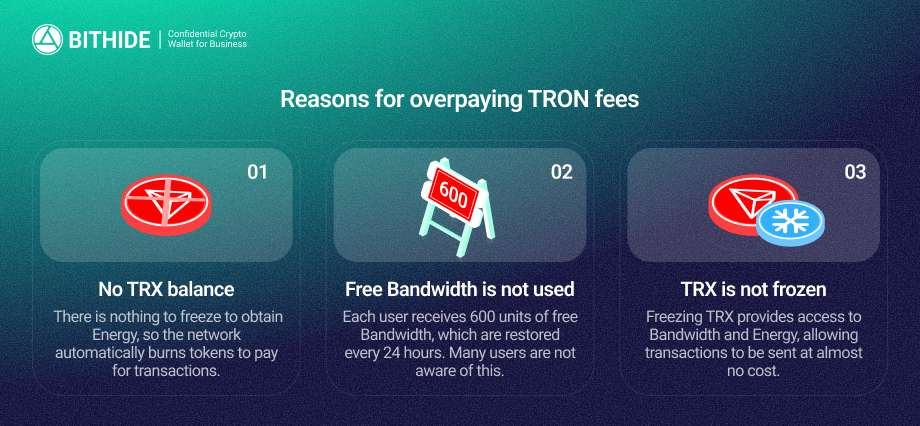
The problem is that most people simply don't understand how TRON's resource system works. They send USDT TRC-20, see the commission deducted in TRX, and think it's normal. There are several reasons for this overpayment.
There are No TRX on the Balance
If you don't have any TRX, there's nothing to freeze to obtain Energy. The network automatically burns TRX for each transaction, and the user pays the full fee.
Free Bandwidth is Not Used
Many people don't even realize they have access to a small amount of free bandwidth every day. Instead, they continue to pay for simple transfers.
TRX Does Not Freeze
Freezing tokens grants access to Bandwidth and Energy, allowing transactions to be sent almost for free. However, this mechanism requires time and understanding of the process, so many ignore it.
How to Save Up to 50% on USDT TRC-20 Transactions
Now let's get to the main point: how to reduce fees and avoid wasting time on complex TRX manipulations. The easiest way is to use BitHide's Energy Bot on Telegram.
Energy Bot — Save Money without Freezing TRX
Our Telegram bot automatically rents Energy for your transactions on the TRON network. You simply enter your address, top up your balance, and send USDT TRC-20. The bot automatically selects the optimal amount of Energy and applies it to the transaction, significantly reducing the cost of USDT TRC-20 transactions.
At the same time, in USDT TRC-20, TRON's commission is reduced to 50%, and you don't need to understand the freezing mechanics or hold large amounts of TRX.
How Does This Work?
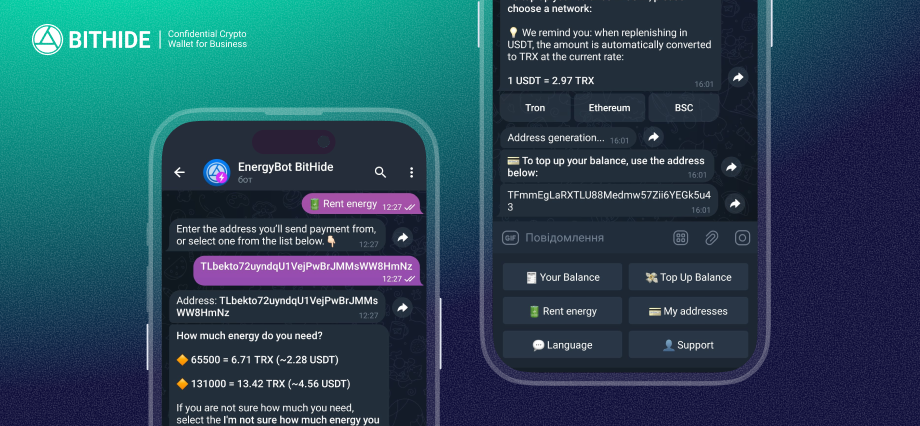
You launch the bot, add your USDT TRC-20 wallet address to send the transfer from, top up your bot balance, and rent Energy. Then, complete the transaction as usual, and the bot automatically applies Energy, reducing the fee. It's simple and straightforward — no calculations, no TRX balance monitoring, no funds being frozen.
The bot interface has several main functions:
- Your balance — here you can see how much money is available for Energy rental.
- Top up your balance — you transfer funds to your bot account to pay for Energy rent.
- Rent Energy — choose the amount of Energy based on your planned transactions. The bot displays the price in TRX and USDT so you can see the real savings.
- My Addresses — Manage the wallet addresses to which rented Energy is applied.
- Language — switch between interface languages.
- Support — if you have any questions, you can always ask for help directly from the bot.
When you rent Energy, the bot offers two options: 65,500 Energy units (~5.46 TRX or ~1.6 USDT) or 131,000 units (~10.92 TRX or ~3.2 USDT). The first option is enough for one standard USDT TRC-20 transaction, the second — two. If you're unsure how much energy is needed, click the «I'm not sure how much energy is needed» button, and the bot will suggest the best option for USDT transfers on the TRON network.
Important: Energy is loaned for one hour. If you don't complete a transaction within that time, it's lost. But this is actually a plus — you don't have to freeze your TRX for a long time and lose liquidity. You can rent Energy right before the transaction, send the transfer, and save money.
You can try Energy Bot right now on Telegram. Just click «Start,» add an address, top up your balance, and send transactions for less.
Optimizing Fees within BitHide
BitHide clients save on USDT TRC-20 transaction fees directly within their crypto wallet. The Energy rental mechanism is integrated into the payment solution and also allows for savings of up to 50% if clients choose to pay fees from their billing balance. If needed, they can switch to TRX payments from Gas Stations with a single click.
Conclusion
Saving on fees on the TRON network is easier than you think. You don't need to understand the mechanics of TRX freezing, hold large amounts of tokens, or constantly monitor your balance. The Energy Bot in Telegram handles all these tasks automatically — renting Energy, sending transactions, and saving money.
The bot format is convenient because it's always at hand. The interface is clear, the operating principle is simple, and the savings are significant. For those who send USDT TRC-20 regularly, but not so frequently that they need to freeze large amounts in TRX, this is the ideal solution.