Release 2511-2512: BitHide App for iOS & Android, Advanced Filters, New Portfolio, and Improved AML Checks
 42
42 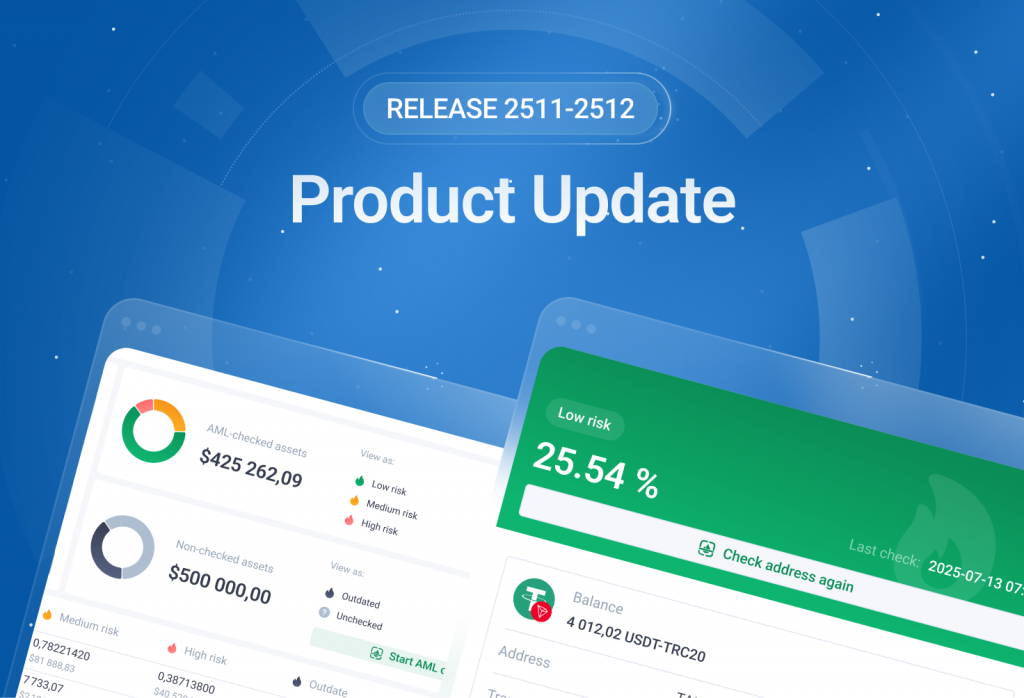
Welcome to Release 2511-2512! We continue improving your daily workflow in BitHide: the mobile app can now be used without Telegram as a standalone application, tables now include advanced filters, and the Portfolio now includes enhanced analytics and the ability to prepare swaps. We also introduced new options for paying fees and activating addresses using BHUSD. The AML results screen has been updated to make key data more transparent, and recipient address checks are now available directly during withdrawals.
BitHide Mobile App* - Now for iOS and Android
We’ve updated the BitHide mobile app. You can now install it directly from the browser and use it just as conveniently as a regular mobile app, without relying on Telegram.
BitHide Mobile App can also be used on a computer. After adding it from the browser, a shortcut appears on your desktop or Dock, and the app opens in a separate window, just like a standard application.
What this means for you:
- BitHide Mobile App installs without the App Store or Google Play;
- The icon appears on your phone’s home screen or on your desktop;
- The app launches in a separate window without a browser address bar;
- A familiar app-like format on both mobile devices and desktop.
* Operational Payouts & BitHide Mobile App Disclaimer
Non-Custodial Control: BitHide (the "Software Provider") does not hold, manage, or have access to any funds processed through the Administrative Panel or the Mobile App. The Company does not act as a payroll processor or a financial intermediary. The technical execution of all transfers is initiated and authorized exclusively by the Client.
Scope of Technology: BitHide provides a specialized infrastructure for managing corporate operational payouts and business-related disbursements. This infrastructure consists of the BitHide Administrative Panel (server-side) and the BitHide Mobile App, which functions exclusively as a remote management interface for the client’s self-hosted environment.
Trusted Devices and PIN Login
BitHide Mobile App remembers your devices and simplifies repeated access:
- On the first login from a new device, confirmation is required;
- After confirmation, the device becomes trusted;
- Further logins require only your login and PIN;
- You can work across multiple devices at the same time.
In the Devices section, you can remove individual sessions or close all sessions except the current one.
-1024x598.png)
Push Notifications
BitHide Mobile App supports push notifications. Messages are delivered directly to your device, and tapping a notification opens the relevant app screen.
- Android - web push always works, notifications are delivered even if the app is open in the browser;
- iOS - notifications work only if the app has been added to the home screen;
- desktop - notifications work if the app was added from the browser and opened in a separate window.
Use BitHide Mobile App for everyday operations. Open the app in your browser, tap Add to screen, and start using it in a full app format.
Advanced Filters in Tables
BitHide now includes a new flexible filtering system for working with large datasets. You can create your own filters with any conditions, combine them using AND/OR, and save them as separate tabs above the table.
-1024x598.png)
Each tab is your own set of conditions: you can edit them, switch between them, copy them, and move them to other BitHide instances if you use multiple environments.
The new system works together with standard column filters: first, the tab is applied, then the column conditions. If no data matches the parameters, a clear message appears with a reset button.
-1024x598.png)
All settings – filters and sorting – are saved automatically and restored the next time you open the table.
Withdraw and Swap* from Tables
In the Wallets, Addresses, and per-wallet Addresses tables, you can now start a send or swap operation for any addresses selected with checkboxes.
- If the selected addresses belong to one currency, BitHide shows their total balance. You can then proceed with a send or a swap – the form will open with the selected addresses and currency already filled in.
- If the selected addresses include multiple currencies, BitHide will offer a list of options with total balances for each available currency. Choose the one you need – and continue the operation with all data prefilled.
This makes working with large datasets much faster: filter → select a group of addresses → go straight to the operation.
-1024x598.png)
*Disclaimer for Swap & Send
The swap functionality is facilitated strictly through the integrated third-party providers. BitHide does not process, hold, or execute fund exchanges on its own infrastructure. By initiating a 'Swap & Send' transaction, the User acknowledges that the exchange is conducted by an independent service provider subject to their own Terms and Conditions and Privacy Policy. BitHide acts solely as a technical interface and assumes no liability for the execution, exchange rates, or regulatory compliance of the third-party provider.
Portfolio: Updated Analytics and Quick Action
We’ve updated the Portfolio – it is now a complete overview of all your assets: you can see the structure of cryptocurrencies and their AML risk level, and you can instantly launch key operations – receiving and sending, and swapping funds. The Receive and Send, and Swap buttons are now placed in the page header, making access to operations faster and clearer.
-1024x598.png)
AML Analytics – Clear and Simple
Two AML analytics cards have been added:
- AML-checked assets – distribution by risk levels: low, medium, high.
- Non-checked assets – outdated and not-yet-checked addresses.
You can switch the display between percentages and dollars. The Start AML Check button opens a window with all addresses that meet the conditions and can be checked right now.
-1024x598.png)
New Format of Quick Swap
A compact block for quick swap is now available in the Portfolio. You select the currencies and the amount, and BitHide immediately shows the current rate and the calculated amount you will receive.
Click Swap Crypto – the swap window will open with prefilled values, and you can proceed with the operation right away.
-1024x598.png)
Assets Table: Structured, Convenient, Interactive
All your currencies are displayed in a unified table – working with assets is now faster and simpler:
- Balances and distribution by risk levels are displayed.
- Rows can be rearranged using drag & drop – your custom order is saved and restored automatically.
- Quick actions are available through the context menu: send, swap, view addresses, and AML check.
- The table is interactive – rows are softly highlighted, showing that you can interact with them.
Open the Portfolio and explore the new tools – the interface is now more straightforward and more convenient for everyday work.
New AML Check Result Screen
We’ve updated the AML Check result window – key data is now visible immediately: risk percentage, risk level color, the date of the last check, and the Recheck Address button. The address balance, its USD equivalent, and the number of transactions are also displayed.
The flow diagram clearly shows where the funds came from and where they were sent. Signal breakdown is now easier to read: you see risk categories, their share in percentages and dollars, and, if needed, you can expand counterparties. The Source of funds and Use of funds tabs help you quickly switch context and understand which operations contribute to the final risk score.
-1024x598.png)
This update makes AML analysis significantly more convenient and faster – you can now assess an address without extra steps.
Recipient Address AML Check During Withdrawal
If you want to ensure the recipient’s address is safe at the moment of sending, you can now do it directly in the withdrawal window. If the address has no up-to-date AML information, BitHide shows a warning and offers to run a check.
While the check is in progress, sending is unavailable, and a progress indicator appears next to the field. Once completed, BitHide returns you to the withdrawal window and displays a risk-level badge next to the address. If you change the address, the status resets – and it can be rechecked.
-1024x598.png)
BitHide displays the address’s risk level before sending, helping you make informed decisions.
Fees and Address Activation – Under Control
BitHide expands fee management across different networks, making costs more transparent and predictable for everyday operations.
Fee Payments in Ethereum and BNB Smart Chain via BHUSD
As with TRON, for Ethereum and BSC, you no longer need to rely on Gas Station balances.
If there are not enough funds to cover the transaction fee at the time of sending, BitHide will offer to pay the fee in BHUSD while keeping the familiar workflow unchanged.
TRON Address Activation
For the TRON network, everything works even more smoothly: if there is enough TRX on the Gas Station, the address is activated automatically as usual. If TRX is insufficient, BitHide will offer address activation via BHUSD, with confirmation and cost display.
Working with TRON Addresses
When creating TRON addresses, both manually and through bulk operations, activation via BHUSD is used when there is not enough TRX.
The same rule applies to transactions with Medium and High safety levels, where transit addresses are used to complete transfers: the need for address activation and its cost are shown before confirmation.
Thank you for being with us. We continue developing BitHide together with you. See you in the next updates!